Posts

Showing posts with the label iPad

Traveling in Style with the Waterfield Field Muzetto

Image
For sometime now I've been looking for a lightweight but stylish bag to carry my Surface 3 and iPad Air when I'm traveling. When I came across the Waterfield Field Muzetto bag I had to take a look at it and see how it could meet my needs. For those of you that may be unfamiliar with the Waterfield bag company they're located in San Francisco and all their bags are made here in United States. Before I ordered my bag I went to the Waterfield website , took a look at their products and found the website easy to navigate and filled with some great looking products. When I finally ordered the Field  Muzetto  bag the process was easy and Waterfield Field  Muzetto streamlined. The  Waterfield   company gives you that special attention and within seconds of ordering the bag I received several emails updating me on the status of the bag. Because each of these bags is handmade I was given a date as to when it would be completed and shipped out....

Vernier Go Wireless Link: Creating New Opportunities for Mobile Data Collection

Image
It certainly is exciting times to be involved in the field of educational technology and if your are a science teacher there is even more opportunities with your existing classroom technology to take advantage of using science probeware in your classroom. If you have been following my blog , you know how passionate I am about teachers using probeware in the classroom to give students the capability of collecting data in real time. This is an especially important tool if you are supporting students with special needs-in that these tools provide students with a way to see data represented in many different types of ways. Students can view the incoming data in a graph format, table and as a meter.  In July, Vernier Software released the Vernier Go Wireless Link which opens up all kinds of opportunities for students collecting real time data with mobile devices. The  Vernier Go Wireless Link  is a very small data collection ...

Equil Smartmarker: Capturing and Streaming Notes from a Whiteboard Just Got a Whole Lot Easier!

Image
Ok, so you already know if you have been reading my blog just how much I love gadgets. Especially, gadgets that are easy to use and can extend the learning that is taking place in my classroom. When I read about the Equil Smartmarker from Luidia a couple of months ago, I was enthralled with the possibilities. As an Assistive Technology Consultant I am often supporting students with disabilities who may require that classroom notes be provided to them.  So when I came across the Equil Smartmarker, I had to get my hands on one to review. Luidia was kind enough to send me an Equil Smartmarker to test in the classroom. The Equil Smartmarker is available from Luidia at a suggested list price of $700 USD. When you first take it out of the case you know from the start that this is a high quality product. The packaging of the Equil Smartmarker is exquisite and Equil Smartmarker from Luidia functional and provides a great case for carrying the device. Plugging the micro USB cable into the...

iPad Workshop: Using the IPad for Students with Learning & Organization Disabilities

Image
Join me for a full day workshop as we explore how the iPad can be used with students with learning and organization disabilities. The multi-sensory design of the iPad has made a big impact in the field of education because it appeals to all learners. There are thousands of applications (apps) in the area of education, with many designed specifically for students with learning disabilities and organizational difficulties. Come learn about the built-in IOS features that make the iPad an ideal device to support students with learning and organizational difficulties. Learn about some new workflows and how students can use the iPad to organize their school life. Come learn about apps that can be used as students move through the writing process, from brainstorming to publishing. During this session you will learn about mind mapping apps, word prediction, text to speech, speech recognition and other supports to assist students in the writing process. Similarly learn about some new and innova...

From Inspiration 9.1 to Inspiration Maps-Seamless!

Image
It is exciting to watch as software publishers are rolling out software that take advantage of each of the respective platforms and in the process creating some powerful workflows. Such is the case for Inspiration 9.1 on the desktop and Inspiration Maps on the iPad. If you have Inspiration 9 installed on your computer and are using Inspiration Maps on your iPad, I would strongly suggest updating your desktop application to version 9.1. I recently did a presentation to administrators on how they can use Evernote to organize their workflow in the cloud and used an Inspiration Map to visually demonstrate the uses. I was able to quickly accomplish this task by opening Inspiration 9.1 on my laptop and creating the map. Since I used web based graphics in my map it was a lot easier to create the map using my computer. When I was done using Inspiration on my laptop, I simply went to the File Menu and selected Export to iPad Inspiration Maps... This automatically...

Exporting your Clicker 6 Grids to Clicker Docs

Image
If you haven't updated your copy of Clicker 6 , I would highly advise it- especially if you are also using Clicker Docs and Clicker Sentences on an iPad. One of the really nice features of the recent update to Clicker 6, is the ability to export your grids to Clicker Sentences and Clicker Docs. The process could not be any easier and it is a great way to re-purpose your grids so that they can be used by students on the iPad.. You can see from the screenshot that under the Clicker Set menu there is now an Export Clicker Set for App option. Once you select either Clicker Sentences  or Clicker Docs - the grid is automatically saved in your Apps folder within your Dropbox account. In this example I created a grid with text from the book Call of the Wild in Clicker 6 and then Exported it to Clicker Docs. Now once in Clicker Docs on my iPad, I can click on the Folder icon on the Top Left and Select Dropbox to see the Grids that I have Exported. Now all that is ...

Setting Up A Kanex meDrive File Server

Image
OK, I'm a bit of a geek and I admit it. I have used hundreds of software titles and apps but setting up a file server-that I have never done. So when Kanex offered me the opportunity to review the  Kanex meDrive File Server I was a little hesitant but thought I would give it  try. I had watched their video on their web site and thought - wow that looks easy. So last week, when the Kanex meDrive File Server arrived, I was eager to see just how easy it really was to set up. The Kanex meDrive File Server is a little smaller than an iPhone in an all white enclosure that resembles what you would expect to purchase from Apple In the box you will find the Kanex meDrive File Server and a micro USB cable, an Ethernet cable, and getting Started Guide. To power the Kanex meDrive File Server you will need to plug it into a power adapter which is not supplied. I found an Eveready Power USB Adapter at Staples for $5 dollars which is plugge...

The iPad and More: Help Children Improve Communication, Cognition, Literacy and Learning

Image
Speakers.. Joan L. Green, M.A. CCC-SLP and Brian S. Friedlander, Ph.D Saturday March 9 th , 2013 9:00 a.m. – 3:00 p.m. Register at www.ist.ticketleap.com Holiday Inn in Hasbrouck Heights           283 State Highway 17  Hasbrouck Heights, NJ 07604 COST: $175 per person including lunch Space is limited  Group rates available ·          Some scholarships are available- contact Joan at Joan@innovativespeech.com ·          1 st 10 registrants receive free copy of Joan’s book- The Ultimate Guide to Assistive Technology in Special Education: Resources for Education, Intervention and Rehabilitation                     Joan Green is a speech-language pathologist from the Washington, DC area with many years of experience helping a wide range of children maximize progress with th...

Clicker Docs for iPad Updated

Image
You can read my original review of Clicker Docs , which adds considerable writing supports for students that need word prediction, text to speech, and talking word wall support. Since my review, Crick Software has released an update to the app which adds some powerful new features. The latest version of Clicker Docs now supports external Bluetooth keyboards, Dropbox, as well as spell checking. While the word prediction feature was well implemented in Clicker Docs- it is now more powerful in that any word that is included in the grid automatically comes to the top of the prediction list when a student is typing. So for example if the student was writing about the rainforest and you had created a grid that included the following words: canopy, orangutan, understory, sloth, opossum, emergent layer, forest floor, etc.- these words would automatically come up to the top of list as the student was typing and could be selected from the prediction bar. You can see from the screen shot...

Voice Dream Reader- Awesome Reading Tool for IOS

Image
I know I may be a little late to the party- but in any case, I do want to share with you an awesome reading app, Voice Dream Reader for the iPad and iPhone which has a number of unique features which makes it a real stand out. I also want to thank Winston Chen the developer for contacting me and giving me the opportunity to review Voice Dream Reader. I had a great conversation with Winston the other day and we had a chance to talk about Voice Dream  Reader and where he saw it going. Voice Dream Reader has been very well received in the assistive technology arena and offers users a number of wonderful features at a very low dollar entry point.   Voice Dream Reader can be purchased in the app store for $9.99 First and foremost, Voice Dream Reader is an excellent app for reading a whole host of different formatted files which include: PDF, ePub, Text, Word, PowerPoint, Pages, Keynote, RTF, and HTML. Voice Dream Reader comes standard with the Acapella Speech Engine ins...

Funding Kickstarter Projects

Image
Over the past year or so I have jumped in and helped to fund several Kickstarter products which has been a lot of fun. In addition to knowing that I am able to help fund a new product I also get the advantage of being on the ground floor when the product is released. This past year I have funded the Touchtype , a case for the iPad and Apple Bluetooth Wireless keyboard, the  Elevation Dock  for the iPhone and the Hidden Radio . All of the products have exceeded my expectations and have made using my iPad and iPhone a real joy to use. Spending time working and sharing with educators the potential for these mobile technologies, it is great to have on hand these innovative products to show and demonstrate. The Touchtype is the perfect solution for individuals like myself that want to use a full size keyboard but want to also be able to store the iPad in convenient and light weight case. The design of the Touchtype is fantastic and is light enough...

Haiku Deck- Elegant Presentations from Your iPad

Image
I recently had a hand at trying a new app called Haiku Deck which is a new presentation tool for the iPad and am very impressed with the results. Haiku Deck is free and is a worthwhile app for anyone who is considering doing a presentation on the iPad. If you are trying to move away from PowerPoint and bulleted points then you are really going to like Haiku Deck. Haiku Deck is ideal for creating beautifully designed presentations that comes with multiple themes that you can select from. Select a theme, add a slide and watch the magic happen as you add pictures and some text. To add a picture you simply type a keyword and Haiku Deck goes out and searches for Creative Common pictures for your use. Add some text and voila you are done. Once you create your Haiku Deck it is easy to share your presentation with others by embedding it, by providing your participants with a link or allowing them to download it as a PDF. I recently created a presentation that I will us...

Rethinking assistive technology in a post-PC world

I had a chance last week to write a blog post for SmartBlogs in Education and wanted to share the link with you. As  Moore’s Law  would have predicted, the pace of technology has been accelerating at an incredible rate in the past couple of years, which has made it a challenge for educators to select and decide on which technology to bring into the classroom. While general education is now wrestling with how to handle the purchase of tablets (iPads) for classroom use, the decisions that have to be made with regards to using these technologies with students in special education has become even a bigger issue.   Continue to Read Article Your comments are welcome!

Naked Flex Mount for the Apple iPad

Image
Always on the look out for new and innovative products, I came across the  Naked Flex Mount from a company in Florida called Seasucker . By Naked, the company means that you don't need a special bracket to mount the iPad with. The Naked Flex Mount utilizes two special 4 1/2 inch vacuum mounts that adhere to any flat surface. The    Naked Flex Mount Kit includes 2 - 4 1/2 inch mounts and a flexible arm that allows you to position your iPad in just about any position. The   Naked Flex Mount System is easy to use and because of the way it works, there is no reason to worry if Apple changes the design to the iPad that it will make it unusable.  So how does it work- very simply set one of the  4 1/2 inch vacuum mounts on a clean surface like a desk and press the finger pump a couple of times to create an incredibly strong vacuum seal. Next screw in the flexible shaft provided and attach the other 4 1/2 inch vacuum mount and attach it to the b...

Some Useful iPad Accessories for Travel

Image
Traveling light is always one of my goals when I travel and with the summer months ahead I will be on the go so I decided to take a look at some handy accessories for my iPad. As much as I enjoy using my iPad, I do find typing with the virtual keyboard to be an annoyance when I have to do a lot of typing. I have looked at several of the portfolio solutions but find the small keyboards get in the way of my typing. Having purchased an Apple Wireless Keyboard some time ago, I decided to see what accessories I could find that would make traveling with the keyboard easier. While at the Apple Store in New York, I came across the Incase Origami case which not only provides the keyboard with some protection but with its unique design it serves to prop your iPad at the right angle making it a great solution for on the go. Using the Incase Origami case is a breeze-just snap your Apple Wireless keyboard into the base and fold back the wings which makes for a great stand. The Incase Origami als...

Printing from the iPad Just Got a lot Easier- Lantronix xPrint Server

Image
One of the frustrating tasks for many iPad users is figuring out how to print directly from your iPad. Some schools have resorted to purchasing Hp Printers with ePrint technology that lets iPad users print directly to these printers over the Wifi network. Once these Hp printers are put on the Wifi network all   you need to do is go to the app , and if printing is supported, it will find the printer and print your document. Other schools have looked for software solutions which usually means that you have to install a printing app on the iPad and then use your Macintosh or Windows computer as a vehicle to route your docuuments before they hit the printer. Realizing the need for schools to have access to their network printers, Lantronix has recently released the Lantronix xPrint Server which when plugged into the network will automatically recognize and detect all of the printers on your network. With the Lantronix  xPrint Server you are now ready to print from your iP...

iPad Summer Institute

                    Location: Warren Middle School Two (1 Day) Sessions of the Summer Institute will be offered on                    Dates: July 10 or July 11th   Presenters Brian S. Friedlander, Ph.D. & Christine Besko-Maughan, M.S., ATP July 10, 2012 Enhancing Academic Performance Using the iPad for Students with Learning Disabilities and Autism Spectrum Disorders The multi-sensory design of the iPad has made a big impact in the field of education because it appeals to all learners. There are thousands of applications (apps) in the area of education, with many designed specifically for students with learning disabilities and autism spectrum disorder (ASD). This workshop will explore many of the apps especially targeted for these populations and address implementation strategies for integrating the iPad in the curriculum. In addition, some communication apps will be explor...

IPevo Delivers with the IPEVO Typi Folio Case

Image
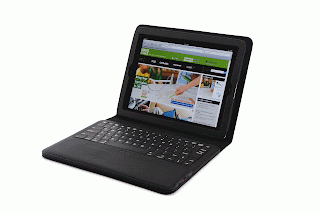
I have always been impressed with the iPevo Company  and the innovative products that they develop for computers and iPad. I had a chance this past week to review the  IPEVO Typi Folio Case which is a well constructed portfolio type of case for the iPad 2 with a Bluetooth Wireless keyboard. The case is made of soft leather and felt which is light weight, slim and attractive. To get started using the  IPEVO Typi Folio Case  just slide your iPad 2 into the case and press the Bluetooth connection button to pair  the keyboard. Pairing the Bluetooth keyboard was a breeze and within seconds I was using the keyboard to type a memo. The top row of the keyboard has dedicated keys to make it easy to navigate, adjust the volume, and play videos. The  IPEVO Typi Folio Case ,  Bluetooth keyboard is comfortable to use and has a region below the keyboard which acts as a a palm rest. The Bluetooth keyboard has a magnet base which keeps the k...

Kingston Wi-Drive: Expanding Your Storage Capacity on Your iPhone & iPad

Image
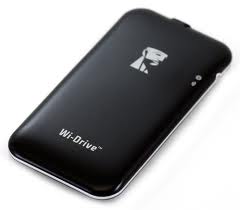
While having a 16 GB iPhone or iPad sounded like you would have lots of storage capacity when you first bought it-before you know it the apps, movies, music and documents begin to take up lots of space and soon you are running on empty. Now what are you going to do? Well with the advent of the Kingston Wi-Drive there is a solution and a good one at that. The Kingston Wi-Drive is available in a 16GB or 32GB configuration and is about the size of the iPhone but slightly slimmer. Once you charge the  Kingston Wi-Drive via the USB charger that is supplied and installed the  Kingston Wi-Drive app you are ready to test it out. Simply plug the  Kingston Wi-Drive into the USB port on your Mac or PC and drag documents, movies, music, and videos onto the drive to copy them over. Once the files are copied dismount the drive and go to your  Settings on your iPad, or iPhone and  to connect to the Wi-Drive Network. Now launch the Wi-Drive app on your iPhone or iPad and lo and...