Posts

Showing posts with the label iphone

Analog to Digital with Roaring Spring Whitelines Notepads

Image
As much as I love my digital tools, there are times when I need to set them aside and use pencil, pen and paper. It was about a year and half ago that I started to use pencil and paper, which resulted in me going down a real creative path and producing a wild number of info-graphics using the Wacom Bamboo Slate. Using the Wacom Bamboo Slate and Bamboo Paper on my iPad I was able to create a work flow that let my creative forces thrive. There are those times when I need to step away from my digital tools and remember what it is like to hold a pencil or pen to paper without the distraction of the computer.  So now when I need to reflect on my projects or ideas, I just sit down with pen and paper and begin to draw or write down my ideas. Using pen and paper has freed me to release my creative energies! But what could be better than to marry the analog with the digital when I need to file these ideas? This is where the Roaring Spring Whitelines notebooks come in. The  Roari...

Extra Power for the Holidays with Jackery Batteries

Image
Jackery Air 6 With the holiday season upon us there is good chance that you will be spending more time out of your home or office and be on your phone more, as you make plans to meet up with friends and family. It is during these times that you begin to realize just how long your battery will take you before your phone shuts off. As great as your smart phone is and all of the apps are, they are of no use if your phone totally discharges. It is times like these that you had wished you were carrying an external battery. When I know that I am going to be out all day and on the go with my iPhone 6, I always carry an external battery. I would like to thank Jackery with providing me with these batteries to review for this blog post. I have used many external batteries over the years and when I came across the Jackery Air 6 for the iPhone I had to take it for a spin. The Jackery Air 6 is beautifully crafted 3000mAh battery with an orange fluorescen...

Tegware Bagel and Boogie Board Perfect Together!

Image
I have been following the digital writing market for some time now and was intrigued when I learned about a new product from Tegware, called the Tegware Bagel , which marries an iPhone case with a small Boogie Board eWriter display, which was released at CES 2014. Having reviewed the original Boogie Board when it was released, I saw first-hand how liberating it was to use for jotting down notes and for doodling and have enjoyed using one ever since. In fact, I now keep a Boogie Board Jot 4.5  on my desk at work to write down reminders and telephone numbers instead of wasting paper. There is a certain beauty in the simplicity of technology when it is done right and in this regard, Tegware has found a sweet spot for using Kent Display's eWriter technology to marry it to an iPhone case. At first glance one might say why would you need to have another display when you have a digital device like an iPhone? That was my first reaction, but soon I realized that there are times when you j...

Walking to Health

Image
Oh the years do catch up to you and when I turned and looked at myself in October 2012, I knew I had to chart a new course with regards to my weight and health, and so I decided to make some changes. I joined  Weight Watchers in mid October and have been attending the meetings religiously which has helped to keep me focused and on track with their program. Each week our Weight Watcher leader encourages us to talk about a topic that  pertains to changing behaviors and thinking about food differently. Having a group of supportive members in the meeting allows us to share new strategies and tactics to help propel us in the right direction. As much as it is a diet - it is really about changing your attitudes and behaviors with regards to food and one's life style. Weight Watchers really instills in you the importance of looking at the ingredients and the size of the food portions. Using their helpful Weight Watchers app for the iPhone , I can quickly...

Setting Up A Kanex meDrive File Server

Image
OK, I'm a bit of a geek and I admit it. I have used hundreds of software titles and apps but setting up a file server-that I have never done. So when Kanex offered me the opportunity to review the  Kanex meDrive File Server I was a little hesitant but thought I would give it  try. I had watched their video on their web site and thought - wow that looks easy. So last week, when the Kanex meDrive File Server arrived, I was eager to see just how easy it really was to set up. The Kanex meDrive File Server is a little smaller than an iPhone in an all white enclosure that resembles what you would expect to purchase from Apple In the box you will find the Kanex meDrive File Server and a micro USB cable, an Ethernet cable, and getting Started Guide. To power the Kanex meDrive File Server you will need to plug it into a power adapter which is not supplied. I found an Eveready Power USB Adapter at Staples for $5 dollars which is plugge...

The Summit 3000 from MyCharge to the Rescue

Image
While having an iPhone 4S has made me much more productive, it seems that wherever I am, I am always looking to plug it in for a quick charge. One of the downsides to owning an iPhone4S is the battery life-make no mistake about that. If I'm traveling and away for the office it not unusual for my iPhone 4S to be down around 10%  by the end of the day. That is where an external battery charger come into play. I recently had a chance to review the Summit 3000 , from MyCharge which is a 3000mAh Rechargeable Power Bank and have to say it did a great job of keeping my iPhone fully charged while I was on the road. According to MyCharge, the Summit 3000 will give you 13 plus hours of talk time and 10 plus hours of Browsing on your smartphone. The Summit 3000 is about the size of the iPhone 4S only a little thicker. What is unique about the Summit 3000 is that all the connectors are built-in so there is no need to worry about toting your cables with you. The Summit 3000 comes eq...

Voice Dream Reader- Awesome Reading Tool for IOS

Image
I know I may be a little late to the party- but in any case, I do want to share with you an awesome reading app, Voice Dream Reader for the iPad and iPhone which has a number of unique features which makes it a real stand out. I also want to thank Winston Chen the developer for contacting me and giving me the opportunity to review Voice Dream Reader. I had a great conversation with Winston the other day and we had a chance to talk about Voice Dream  Reader and where he saw it going. Voice Dream Reader has been very well received in the assistive technology arena and offers users a number of wonderful features at a very low dollar entry point.   Voice Dream Reader can be purchased in the app store for $9.99 First and foremost, Voice Dream Reader is an excellent app for reading a whole host of different formatted files which include: PDF, ePub, Text, Word, PowerPoint, Pages, Keynote, RTF, and HTML. Voice Dream Reader comes standard with the Acapella Speech Engine ins...

Social Networking in the Age of Natural Disasters

Image
I'm sitting here today on Thanksgiving Day reflecting on just how thankful I am for family and friends who helped us out during hurricane Sandy! Thankfully our house was spared, but for many like myself we were without power for many days and only resumed our regular schedule last week. To say the least it was very disorienting not having a regular schedule and moving around New Jersey from family and friends to find homes that had power. The college where I teach got hit hard and was without power for two weeks. During this time, we were alerted about the college closing via an automated system that emails and phones us to give us periodic updates. Because of the nature of the damage there were some faculty and students who reported having trouble getting emails and for a lot of us our only consistent way to get information was using our cell phones which worked pretty well- as long as you were able to keep it charged. There were many times during the two ...

Swivl-The Hands Free Way to Record Video on Your iPhone

Image
I would like to thank the folks at Satarri, Inc for sending me the Swivl to review, which arrived this past week. The Swivl is an innovative product for the iPhone 4, 4S and iPod Touch 4th generation that lets you capture video without the need for a camera-person. The Swivl is comprised of two different units-the Swivl base and the Marker. The Swivl base is a motorized turret that houses your iPhone and allows the base to communicate with the Marker which can follow your movements as you record. Set up was a breeze at the company provided a Quick Start Guide that got you up and running quickly. To get started I downloaded the free Swivl app to my iPhone 4S, placed the provided batteries (nice touch) into the Swivl base and Marker and then seated the iPhone on the Swivl base and plugged in the connector. I powered up the Swivl base and the Marker, opened the Swivl app and hit the record button to start the video recording. As I moved around the Swivl followed me which made rec...

Printing from the iPad Just Got a lot Easier- Lantronix xPrint Server

Image
One of the frustrating tasks for many iPad users is figuring out how to print directly from your iPad. Some schools have resorted to purchasing Hp Printers with ePrint technology that lets iPad users print directly to these printers over the Wifi network. Once these Hp printers are put on the Wifi network all   you need to do is go to the app , and if printing is supported, it will find the printer and print your document. Other schools have looked for software solutions which usually means that you have to install a printing app on the iPad and then use your Macintosh or Windows computer as a vehicle to route your docuuments before they hit the printer. Realizing the need for schools to have access to their network printers, Lantronix has recently released the Lantronix xPrint Server which when plugged into the network will automatically recognize and detect all of the printers on your network. With the Lantronix  xPrint Server you are now ready to print from your iP...

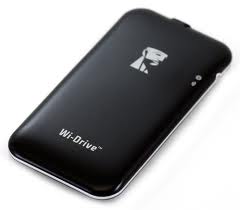
Kingston Wi-Drive: Expanding Your Storage Capacity on Your iPhone & iPad

Image
While having a 16 GB iPhone or iPad sounded like you would have lots of storage capacity when you first bought it-before you know it the apps, movies, music and documents begin to take up lots of space and soon you are running on empty. Now what are you going to do? Well with the advent of the Kingston Wi-Drive there is a solution and a good one at that. The Kingston Wi-Drive is available in a 16GB or 32GB configuration and is about the size of the iPhone but slightly slimmer. Once you charge the  Kingston Wi-Drive via the USB charger that is supplied and installed the  Kingston Wi-Drive app you are ready to test it out. Simply plug the  Kingston Wi-Drive into the USB port on your Mac or PC and drag documents, movies, music, and videos onto the drive to copy them over. Once the files are copied dismount the drive and go to your  Settings on your iPad, or iPhone and  to connect to the Wi-Drive Network. Now launch the Wi-Drive app on your iPhone or iPad and lo and...