Posts

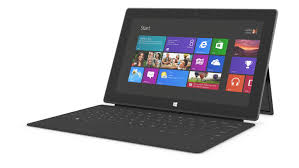
Using Some Peripherals with the Surface RT
Image
The summer really kicked off for me when I attended the ISTE 2013 Conference in San Antonio the end of June. It has been a busy summer doing workshops, consulting and working with new hardware and apps. I was fortunate to receive a Windows Surface RT from the Microsoft Education Team at ISTE 2013 and have been exploring its feature set and how it could be used in the classroom. Using the Windows Surface RT, I have become accustomed to using Windows 8 on a tablet and have enjoyed learning the new operating system which has some nice features. Unlike the Windows Surface RT's big brother the Windows Surface Pro- you can not install Windows 8 legacy software on the Windows Surface RT and are relegated to downloading apps form the Microsoft Store. While the number of educational apps is growing there is still a need for more high quality apps for use by educators. Having said that, there is still a good base of apps for students and teachers to utilize on the Windows Surface RT especia...

Presented at the Teacher Meetup NJ 2013 Unconference Today

Image
What other profession do you know of, that would sacrifice a whole day for professional development without pay? Welcome to the world of teaching and the un-conference model which is turning the world of professional development on its heels. Today more than 200 teachers arrived at Richard Stockton College for a full day of professional development with a focus on educational technology . The day started off with a Kidspiration Maps and iReadWrite . Both programs were very well received and offer students a great deal of support in the area of written language. series of quick 20 minute presentations by teachers on all kinds of interesting technology topics. I presented in one of the 20 minutes modules with a focus on reading and writing apps for struggling students. In the 20 minute time period I was able to demo the recently released apps: If you have't taken a look at the Kidspiration Maps which was recently released, I urge you to do so. It incorporates a great deal of ...

Kicking the Tires on the Microsoft Surface RT

Image
ISTE 2013 is long gone and is now just a fleeting memory- but wow was it fun! The ISTE conferences by and large remains one of my most favorite conferences to attend. This year was a lot of fun as I had a chance to meet educators from around the globe who see the potential for creating environments in the classroom and beyond that engage and enlighten students. No doubt we are moving into a post PC world which was evidenced by the sheer number of companies showing off their tablet solutions for the classroom. One of the companies which certainly made a big Public Relations splash this year was Microsoft. As part of Windows in the Classroom Surface Experience Project, Microsoft gave away   10,000 Windows Surface RT's to educators who attended the ISTE conference. It was quite interesting to see educators at the conference carrying their iPad in one hand and their new Surface RT in their left . I even spotted a group of teachers in the hotel one night sitting around the ...

Belkin Sets the Stage!

Image
As the iPad takes hold of the classroom, educators are looking for new ways to extend the functionality of the device and take advantage of it's powerful feature set. While many of us have utilized the camera on the iPad for still photographs or for taking classroom videos- companies like Belkin want to extend the reach of these capabilities and help teachers get the most out of their iPad investment. With this in mind Belkin has just released the Belkin Tablet Stage which turns your iPad into a document camera and presentation system. Having had a chance to work with the Belkin Tablet Stage first hand, I am impressed with the quality and attention to detail of the design. Putting together the Belkin Tablet Stage took about 10 minutes and was rather straight forward using the step by step directions in the booklet that accompanied the device. The Belkin Tablet Stage cradle can accompany a wide range of tablets, everything from the iPad 2, Samsung Galaxy, to the iPad...

ISTE 2013- What I Will Be Packing!

Well it is hard to believe that another year has come and gone and I will be off to ISTE 2103 Conference in San Antonio in a couple of days! It figures to be an exciting venue with over 18,000 educators attending. I am sensing a lot of energy this year which should make for a great show. I put this Haiku Deck together to give you a glimpse of what I will be packing. Enjoy-and stay tuned for some new product announcements on my blog! www.haikudeck.com

iPad Workshop: Using the IPad for Students with Learning & Organization Disabilities

Image
Join me for a full day workshop as we explore how the iPad can be used with students with learning and organization disabilities. The multi-sensory design of the iPad has made a big impact in the field of education because it appeals to all learners. There are thousands of applications (apps) in the area of education, with many designed specifically for students with learning disabilities and organizational difficulties. Come learn about the built-in IOS features that make the iPad an ideal device to support students with learning and organizational difficulties. Learn about some new workflows and how students can use the iPad to organize their school life. Come learn about apps that can be used as students move through the writing process, from brainstorming to publishing. During this session you will learn about mind mapping apps, word prediction, text to speech, speech recognition and other supports to assist students in the writing process. Similarly learn about some new and innova...

Doing Somersaults with The MAX HandStand DX

Image
As I had noted in a previous post one of the technology trends that you be seeing in the upcoming school year will the be the use of the iPad as a document camera and as presentation tool! The iPad will give MAX HandStand DX teachers the flexibility to teach and do demonstrations like no other tool they have ever used. It is truly exciting times for educational technology and for teachers to harness the power of these tools. I for one no longer take my laptop with me when I do presentations, but instead reach for my iPad and Apple TV. By connecting my Apple TV to my Epson PowerLite 915W projector with HDMI, I can take advantage of Apple's Airplay Technology and project images and apps from my iPad to the screen.  What a great experience it is to be able to utilize my iPad as a presentation and teaching tool. But now watch what happens when I pair up my iPad and Apple TV with the  MAX HandStand DX , The MAX HandStand DX is a solidly built stand for the iPad that can be aff...